
Contents
1 Using different aggregation methods
2 The keep-it-simple-please instructor
4 Category or site aggregation
7 Using the gradebook at a fraction of its potential
8 Hassling users who are not pulling their weight (Deadline/lateness tracking)
Using different aggregation methods
- Using ‘Weighted mean of grades’
- Using ‘Sum of grades’ Case 1 – Brand new course, no existing assignments or categories, the sum of points grading with a single category
- Using ‘Sum of grades’ with a grade calculation Case 2 – This case begins with a course containing assignments, but no categories. It will illustrate the creation of categories, putting assignments in categories, and setting up the grade calculation to produce the total number of points earned for the course. We will also take a look at setting up an uncategorized section to allow for assignments that should not be included in the final point total.
The keep-it-simple-please instructor
The keep-it-simple-please instructor just wants to look at the gradebook but doesn’t want to change anything (even by accident!). They’d like the total grade for the course to be calculated just the same as the default.
The keep-it-simple-please instructor needs an easy way to look at an individual user’s grades from the gradebook for parents’ evenings.
Gradebook set-up
A view-only version of the gradebook can be created for the keep-it-simple-please instructor by not setting (or preventing) some/all of the following capabilities: Edit grades, Hide/unhide grades or items, Lock grades or items, Manage grade items, Manage letter grades, Unlock grades or items.
At a glance reporting
For writing reports and quickly finding out who in the class needs attention to prevent them falling behind (or for gifted/talented enrichment), the gradebook needs to show information about pass/fail grades and deadline meeting without further clicks.
Setting grade to pass is a good way to make the passed items show up with a green background, so this is a start, although it is not in any way clear that this functionality exists and the editing icon for the gradebook columns is not easy to spot as distinct from all of the others. It would help if grade to pass could be set from within modules as this would be the intuitive place to look for it. There is an urgent need for a way to identify late work visually and also to show work which has been submitted (on time or otherwise) but is not yet marked.
These changes would bring the gradebook in line with paper registers in terms of basic at a glance access to information, which is often encoded idiosyncratically with different marks or pen colors. There is probably some room for discussion of how much information can be carried by each cell, but with border colors currently unused and perhaps background images this must be possible (although there may need to be a separate image for every possible combination of CSS classes in order to preserve info on browsers that don’t support transparency).
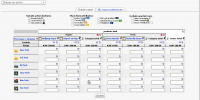
Mockup showing header toggles for cell attributes
To build on what Matt said above I’ve created some mockups of improvements to the interface of the grader report. The major feature that applies to this topic is the use of grade item attributes that can be checked on or off in the header of the report (much the same way “Show Hide/show icons” and “Show locks” are now done). I’ve taken the liberty to update the language to be more noun or verb focused based on attribute or action respectively.
The “action buttons” and “special rows” are very similar in behavior to current. The attributes are displayed as colored tags in each grade cell.
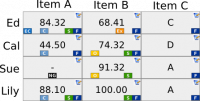
Mockup showing how attributes would be organized in grade cells
Some notes on the grade cell tags:
- The position of each tag within a grade cell is consistent no matter how many or which tags are displayed. This improves scanning speed and accuracy.
- Clicking on the tag icon in the legend at the top would (through the power of javascript) highlight all the grade cells that have that tag set within them (much like you can now highlight a row or column). This would make it trivially easy to quickly find the grades which are late or need to be marked, etc.
I think that’s the best solution I’ve seen yet. I would add that tooltips for each of the little tags could provide the extra info like how much extra credit was given and when and by whom. This currently happens only for feedback, and there needs to be a better solution as sometimes the information is too much for the screen space.
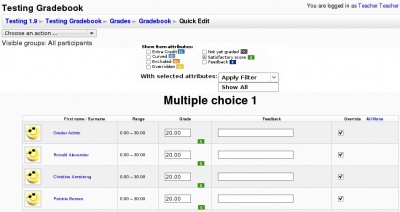
Mockup showing filters for item attributes on LSU Quick Edit Grades Report
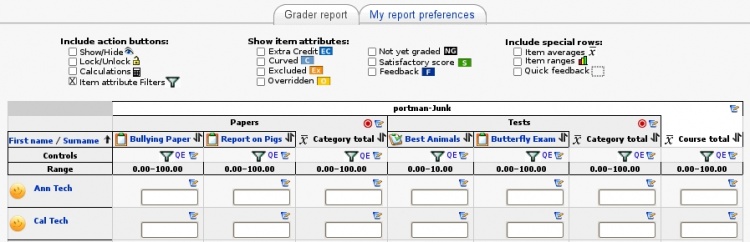
Mockup showing filters for item attributes on grader report
Filters for At a glance reporting and editing
Grade item attributes could also be used to apply a filter to:
- one or more Columns in the grader report
- a Quick Edit page (LSU)
This would be very helpful when an instructor wants to:
- View/Edit only grades which meet a certain criteria
- Drill down into the detail
Category or site aggregation
For a one-year teaching programme, I am currently using 6 courses and manage enrollments with a Metacourse. David’s excellent subcourse module lets me add course totals from the sub-courses to the metacourse gradebook, but it’s non-standard and should really appear as part of a metacourse by default. It could also do with a cron component so that it doesn’t have to be manually fetched all the time. If it were possible to have a similar module that would pick an arbitrary grade or aggregate from another course, instead of the total, that would make this very powerful.
Even better would be the option to have a metacourse display an aggregate gradebook of all it’s child courses (courses it gets its enrollment information from), so that the gradebooks are all displayed side by side.
Target tracking
Use the gradebook primarily to track a pupil’s progress in terms of meeting the targets that they were previously set. This is already possible to a certain extent using the hover-over tooltips for feedback, but not all modules can do this. Having a separate comment field in each grading screen to specify a clear target as distinct from general comments would be ideal, along with a checkbox to say if the previous one has been achieved, but is a bit outside the gradebook scope.
Participation tracking
For my courses, I often set a participation target e.g. ‘post twice in this forum and reply twice’, but this is impossible to grade automatically, even though it’s just a matter of checking the logs on a cron run. A new module to do this (whilst again, slightly outside the scope of the gradebook) would make the gradebook that much more useful for one-stop whole course monitoring.
- The Activity completion part of Conditional activities already does this.
Using the gradebook at a fraction of its potential
Maybe the most common use-case 🙂 LMS’s general aversion to direct on-screen guidance, rather than pop-up help, or semi-obscure guidance in lmsdocs could easily lead most users to miss features that they could make amazing use of. Tooltips for absolutely everything and small amounts of on-screen help would also be very useful in letting people know what’s possible. As an example – how can one check the history of a grade that’s been changed? I still can’t work out how to do this and I would consider myself a power user. Can it be done? If so, some documentation or on-screen help is needed.
Hassling users who are not pulling their weight (Deadline/lateness tracking)
I’d ideally like to be able to look at the gradebook, see that X users are constantly missing deadlines and be able to message them there and then using simple checkboxes. Even better would be the option to have an automatic mailmerge done using the address field of the user profiles and some standard letter template so that I could download pre-written letters to these users or their parents/guardians pointing out to them what they have not done, and the dire consequences they can expect if they keep slacking.
Additionally, being able to extend deadlines for some users e.g. those who were absent on the day the assignment was set would be necessary to make this work in practice.
Extra Credit
At our institution we see that every grade item (at least those that are numeric) needs an extra credit field. The contents of the field determine how extra credit is applied to that item, category, or course category. If the contents are a whole or real number (‘5′, ’24’, ‘1.5’), the extra credit field is added to the numerator prior to normalization of the grade. If the contents of the extra credit field is a percentage (‘5%’) then that value is added to the normalized value of the item. Likewise, extra credit could be added to categories or the course category, but in this case only percentages could be added (unless sum of grades is used in the category). There would need to be a visual cue to both the instructor and user that a given grade item has had extra credit adjustments made to it. Finally, I could see use cases where lists of extra credit would need to be added to grade items (so more than one piece of extra credit could be added to a category per person.
Reducing aggregation methods available in the gradebook
“A Point’s a Point (currently, “Sum of Points”), “Average of Percents” (currently “Simple weighted mean of grades”), “Weighted Average” (currently “Weighted mean of grades). I can’t seem to think of use-cases where something else would be needed. Perhaps the rest of those methods have been provided for the 5% of users who might use them.