
Lesson activity has a “Dependent on” group of setting which will not allow a user to enter the lesson without meeting certain conditions. This is similar to the Conditional activities in LMS. However, this feature can only be found for the Lesson activity.
Contents
Basic settings
The dependent on” settings might be considered an advanced feature. Until you understand how they work, it is best to start off by keeping it simple.
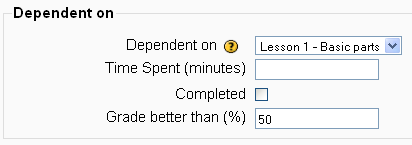
Dependent on
This field has a pull-down menu that lists every lesson by title. You may select one.
- TIP: If you are importing or restoring a course be sure to check the dependencies and the “link to activity” settings of your lessons.
Time Spent (minutes)
The amount of time in minutes that a user spent in the dependent lesson in their last session.
- TIP: The time is not cumulative. Thus, a user who has completed most of the dependent lesson but left the lesson and returned later, may not meet the time requirement.
Completed
This means the user has answered at least one question.
- TIP: Make sure you give the user the opportunity to answer a question in the dependent lesson if you check this box.
Grade better than ( % )
This requires a percent. The user will be told that they must score at least a 70% on the dependent lesson, not that they must receive at least a “C” on the dependent lesson.
Example uses
The daisy chain refers to a series of lessons, where entering a lesson is dependent upon meeting some minimum standard on the previous one.
Using a ‘daisy chain’, the trainer can attest that a user maintained at least an 80% average through the entire course.